Benchmarking Ubuntu vs Windows on the same HP ZBook
Laptop specs 🔗
I have an HP ZBook 15 G3 with HP 80D5 motherboard.
CPU Information (processor):
| item | info |
|---|---|
| Name | Intel Core i7-6820HQ |
| Topology | 1 Processor, 4 Cores, 8 Threads |
| Identifier | GenuineIntel Family 6 Model 94 Stepping 3 |
| Base Frequency | 2.71 GHz |
| Cluster 1 | 4 Cores |
| Maximum Frequency | 3590 MHz |
| Package | Socket 1440 FCBGA |
| Codename | Skylake |
| L1 Instruction Cache | 32.0 KB x 4 |
| L1 Data Cache | 32.0 KB x 4 |
| L2 Cache | 256 KB x 4 |
| L3 Cache | 8.00 MB x 1 |
| Instruction Sets | sse2 sse3 pclmul fma3 sse41 aesni avx avx2 |
Memory Information (RAM):
| item | info |
|---|---|
| Size | 16.00 GB |
| Transfer Rate | 2126 MT/s |
| Type | DDR4 SDRAM |
| Channels | 1 |
Storage:
| storage | usage |
|---|---|
| 1 TB SSD | Windows 10 + a partition for common data |
| 256 GB SSD | Ubuntu Linux |
Operating systems 🔗
I have a dualboot setup of Ubuntu 24.04 LTS (Linux distro) and Microsoft Windows 10 Pro.
I have Microsoft Windows 10 Pro (64-bit) installed on an SSD and battery power plan set to balanced/performance.
And I have Ubuntu 24.04.3 LTS installed on another SSD storage, and power plan is set to performance.
The laptop computer was connected to the charger all the time while testing and benchmarking. It was plugged in for better performance.
Web benchmark: Speedometer 3.1 🔗
I used the famous Speedometer 3.1 benchmark for the web technologies on Google Chrome - the #1 web browser on Windows and Linux.
Windows 10 🔗
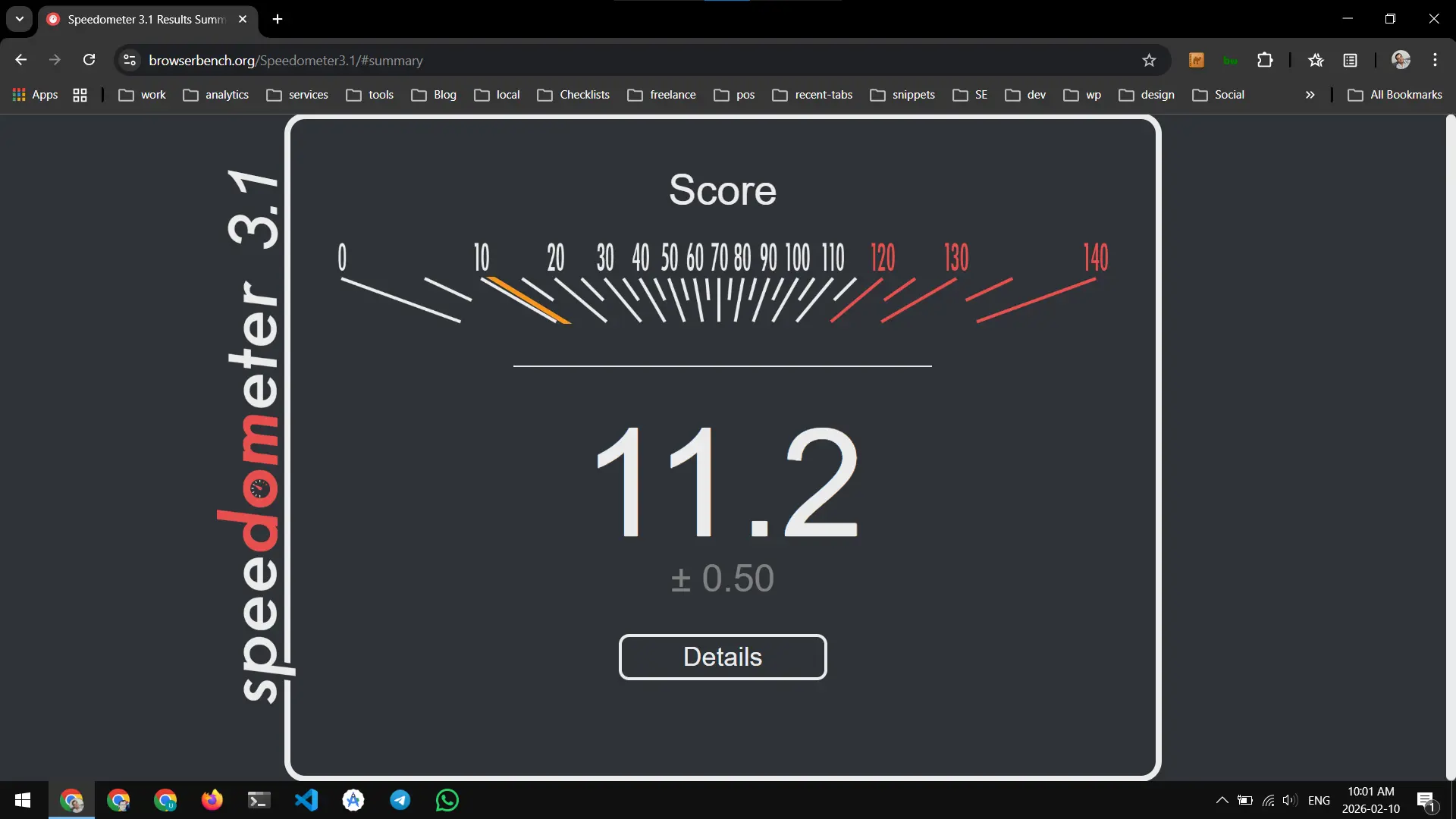
The first iteration:
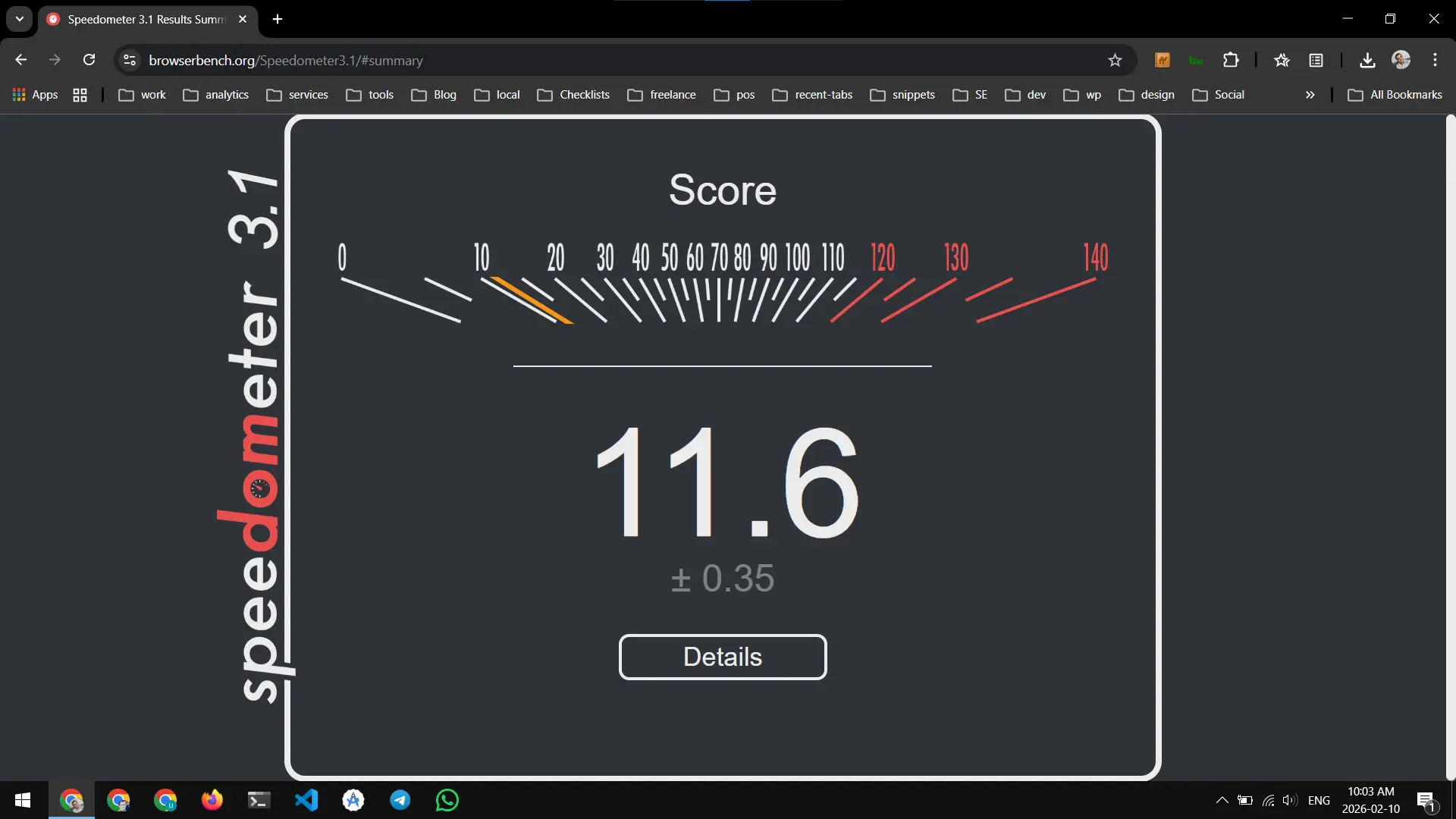
The second iteration:
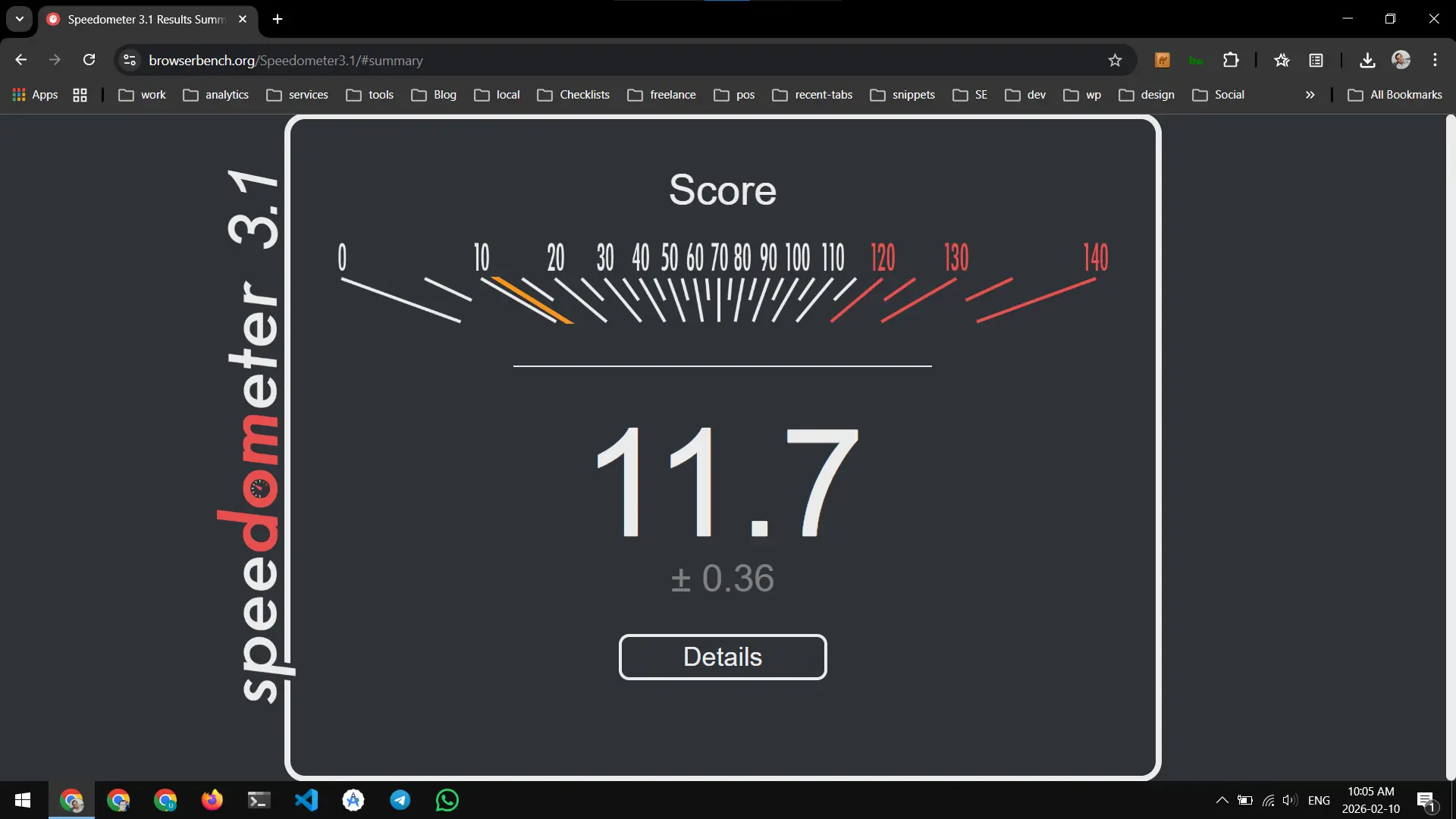
The third iteration:
Ubuntu 🔗
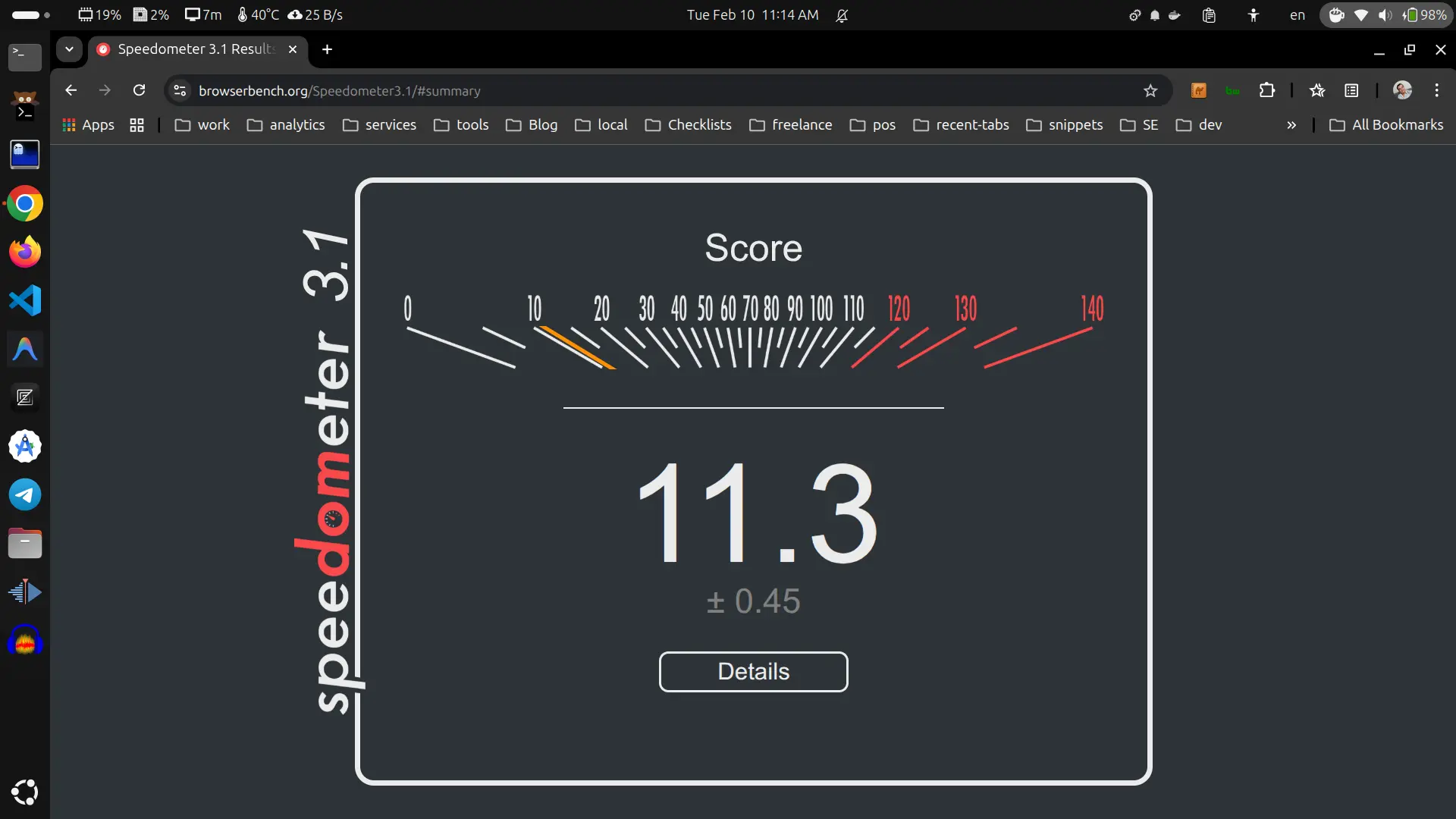
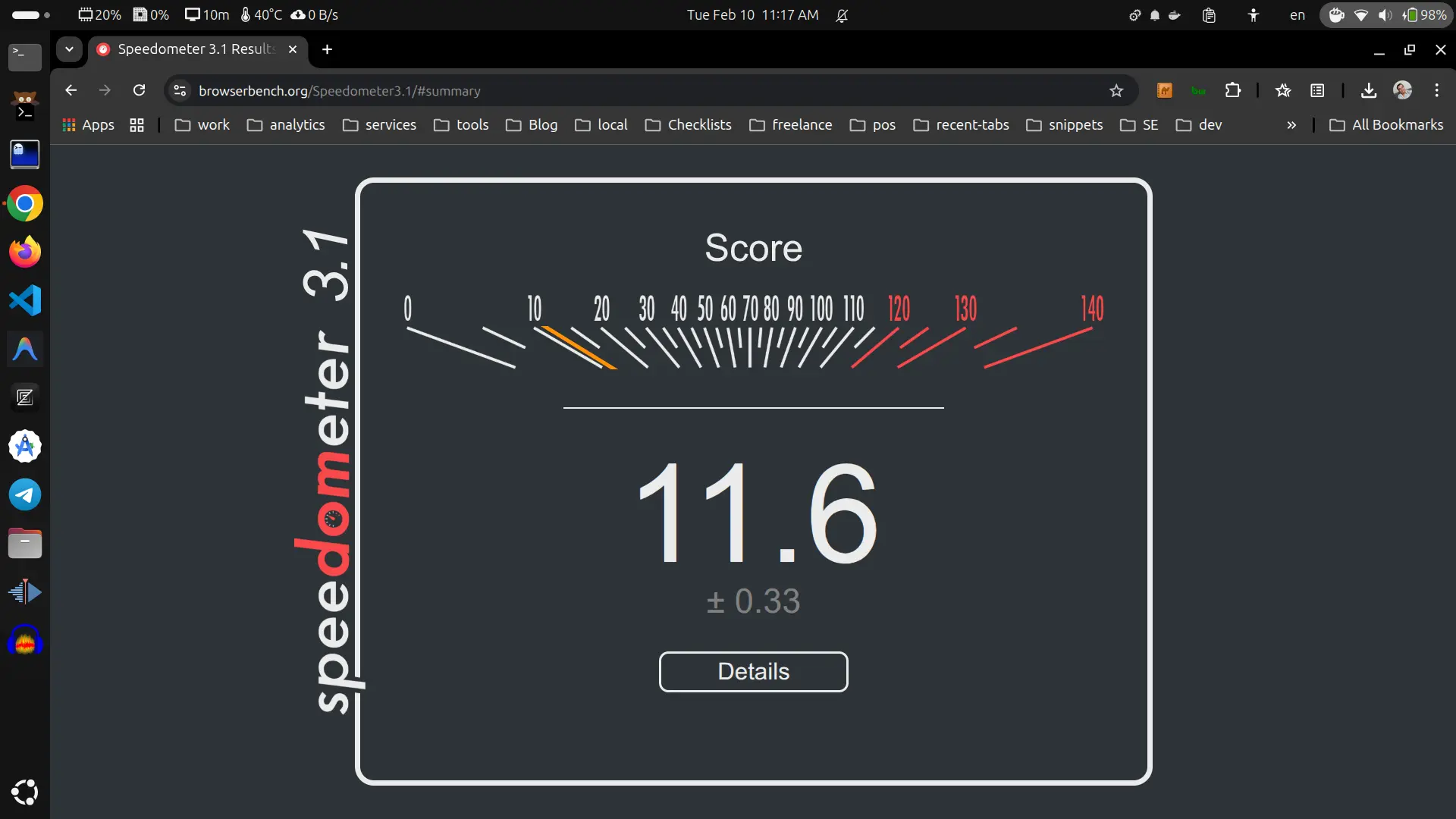
The first iteration:
The second iteration:
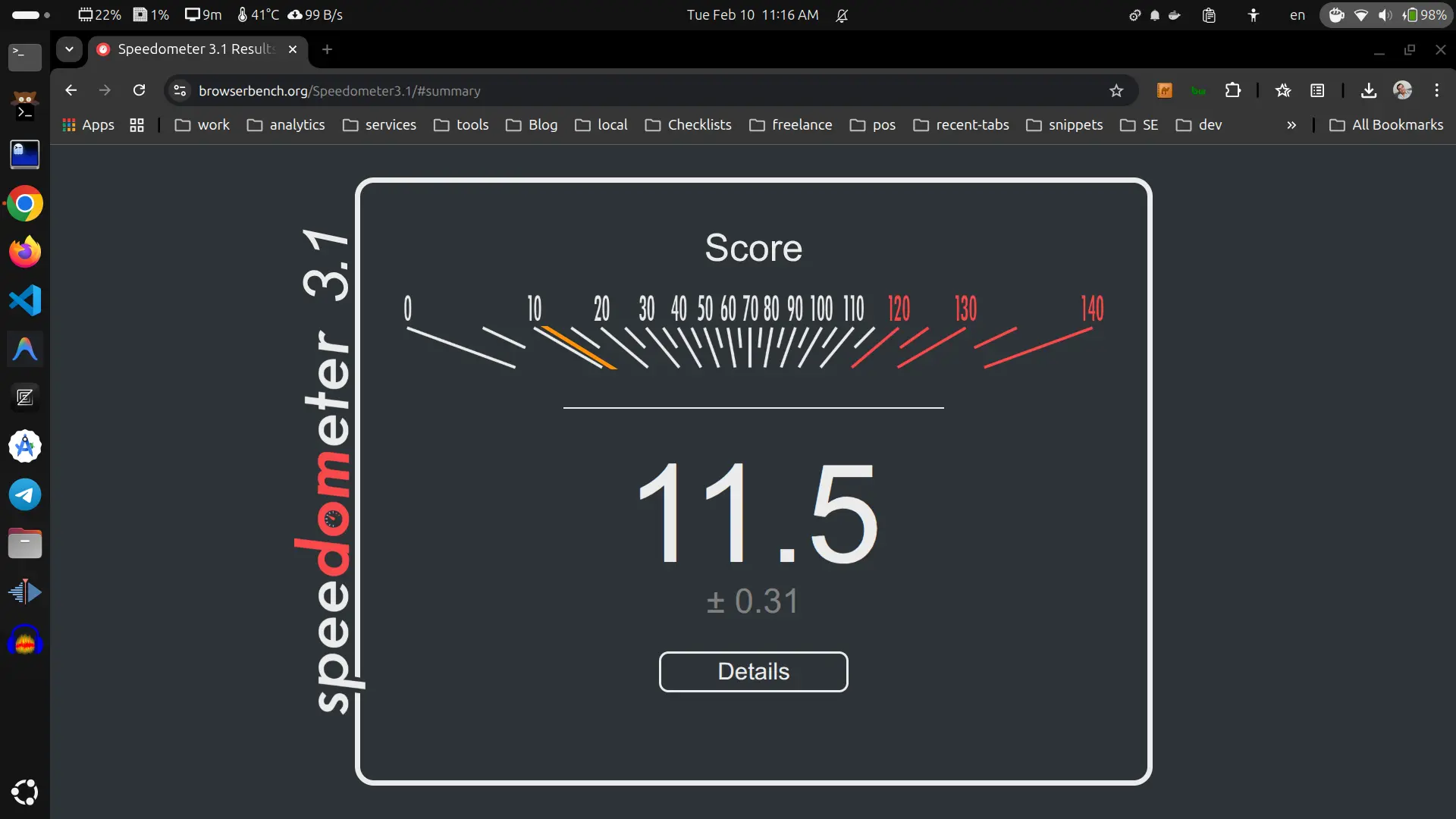
The third iteration:
Crunching web benchmark numbers 🔗
Average web benchmark on Microsoft Windows 10 pro is (11.2+11.6+11.7)/3 = 11.5
Average web benchmark on Ubuntu 24.04 LTS is (11.3+11.5+11.6)/3 = 11.4666667
The web benchmark slightly better on Windows because Google (creator of Chrome) historically prioritizes Windows-specifc GPU acceleration and compiler optimizations.
Geekbench 6 🔗
Geekbench 6 measures a device’s CPU and GPU performance. It is the famous benchmark everyone uses. Let’s see the results and compare!
Microsoft Windows 10 pro 🔗
| benchmark | results linking to Geekbench result page |
|---|---|
| CPU | Single-Core Score: 1216 Multi-Core Score: 3402 |
| OpenCL on Nvidia Quadro M1200 | OpenCL Score: 11707 |
| OpenCL on Intel HD Graphics 530 | OpenCL Score: 4698 |
| Vulkan on Quadro M1200 | Vulkan Score: 10346 |
| Vulkan on Intel HD Graphics 530 | Vulkan Score: 4823 |
Ubuntu 24.04.3 LTS (Canonical’s Linux distro) 🔗
I benchmarked OpenCL on Quadro M1200 using this command:
./geekbench6 --gpu OpenCL --gpu-platform-id 0 --gpu-device-id 0
and the output was:
Geekbench 6.5.0 : https://www.geekbench.com/

Geekbench 6 requires an active internet connection and automatically uploads
benchmark results to the Geekbench Browser.

Upgrade to Geekbench 6 Pro to enable offline use and unlock other features:

  https://store.primatelabs.com/v6

Enter your Geekbench 6 Pro license using the following command line:

  ./geekbench6 --unlock <email> <key>

[0210/121812:FATAL:nvml_library.cpp(153)] Failed to load nvmlInit_v2: /home/ubuntu/Downloads/Geekbench-6.5.0-Linux/geekbench_avx2: undefined symbol: nvmlInit_v2
System Information
  Operating System              Ubuntu 24.04.3 LTS
  Kernel                        Linux 6.17.0-14-generic x86_64
  Model                         HP HP ZBook 15 G3
  Motherboard                   HP 80D5
  BIOS                          HP N81 Ver. 01.62

CPU Information
  Name                          Intel Core i7-6820HQ
  Topology                      1 Processor, 4 Cores, 8 Threads
  Identifier                    GenuineIntel Family 6 Model 94 Stepping 3
  Base Frequency                3.60 GHz
  L1 Instruction Cache          32.0 KB x 4
  L1 Data Cache                 32.0 KB x 4
  L2 Cache                      256 KB x 4
  L3 Cache                      8.00 MB
  Instruction Sets              sse2 sse3 pclmul fma3 sse41 aesni avx avx2

Memory Information
  Size                          15.5 GB

OpenCL Information
  Platform Vendor               NVIDIA Corporation
  Platform Name                 NVIDIA CUDA
  Device Vendor                 NVIDIA Corporation
  Device Name                   Quadro M1200
  Device Driver Version         580.126 .16
  Maximum Frequency             1148 MHz
  Compute Units                 5
  Device Memory                 3.94 GB


OpenCL
  Running Background Blur
  Running Face Detection
  Running Horizon Detection
  Running Edge Detection
  Running Gaussian Blur
  Running Feature Matching
  Running Stereo Matching
  Running Particle Physics


Uploading results to the Geekbench Browser. This could take a minute or two
depending on the speed of your internet connection.

Upload succeeded. Visit the following link and view your results online:

  https://browser.geekbench.com/v6/compute/5769927

Visit the following link and add this result to your profile:

  https://browser.geekbench.com/v6/compute/5769927/claim?key=870587
And I benchmarked Vulkan on Intel(R) HD Graphics 530 (SKL GT2) using this command:
./geekbench6 --gpu Vulkan --gpu-platform-id 0 --gpu-device-id 0
And the output was like this:
Geekbench 6.5.0 : https://www.geekbench.com/

Geekbench 6 requires an active internet connection and automatically uploads
benchmark results to the Geekbench Browser.

Upgrade to Geekbench 6 Pro to enable offline use and unlock other features:

  https://store.primatelabs.com/v6

Enter your Geekbench 6 Pro license using the following command line:

  ./geekbench6 --unlock <email> <key>

System Information
  Operating System              Ubuntu 24.04.3 LTS
  Kernel                        Linux 6.17.0-14-generic x86_64
  Model                         HP HP ZBook 15 G3
  Motherboard                   HP 80D5
  BIOS                          HP N81 Ver. 01.62

CPU Information
  Name                          Intel Core i7-6820HQ
  Topology                      1 Processor, 4 Cores, 8 Threads
  Identifier                    GenuineIntel Family 6 Model 94 Stepping 3
  Base Frequency                3.60 GHz
  L1 Instruction Cache          32.0 KB x 4
  L1 Data Cache                 32.0 KB x 4
  L2 Cache                      256 KB x 4
  L3 Cache                      8.00 MB
  Instruction Sets              sse2 sse3 pclmul fma3 sse41 aesni avx avx2

Memory Information
  Size                          15.5 GB

Vulkan Information
  Device Name                   Intel(R) HD Graphics 530 (SKL GT2)


Vulkan
  Running Background Blur
  Running Face Detection
  Running Horizon Detection
  Running Edge Detection
  Running Gaussian Blur
  Running Feature Matching
  Running Stereo Matching
  Running Particle Physics


Uploading results to the Geekbench Browser. This could take a minute or two
depending on the speed of your internet connection.

Upload succeeded. Visit the following link and view your results online:

  https://browser.geekbench.com/v6/compute/5769955

Visit the following link and add this result to your profile:

  https://browser.geekbench.com/v6/compute/5769955/claim?key=698960
And I benchmarked Vulkan on Quadro M1200 using this command:
./geekbench6 --gpu Vulkan --gpu-platform-id 0 --gpu-device-id 1
The output was like this:
Geekbench 6.5.0 : https://www.geekbench.com/

Geekbench 6 requires an active internet connection and automatically uploads
benchmark results to the Geekbench Browser.

Upgrade to Geekbench 6 Pro to enable offline use and unlock other features:

  https://store.primatelabs.com/v6

Enter your Geekbench 6 Pro license using the following command line:

  ./geekbench6 --unlock <email> <key>

System Information
  Operating System              Ubuntu 24.04.3 LTS
  Kernel                        Linux 6.17.0-14-generic x86_64
  Model                         HP HP ZBook 15 G3
  Motherboard                   HP 80D5
  BIOS                          HP N81 Ver. 01.62

CPU Information
  Name                          Intel Core i7-6820HQ
  Topology                      1 Processor, 4 Cores, 8 Threads
  Identifier                    GenuineIntel Family 6 Model 94 Stepping 3
  Base Frequency                3.60 GHz
  L1 Instruction Cache          32.0 KB x 4
  L1 Data Cache                 32.0 KB x 4
  L2 Cache                      256 KB x 4
  L3 Cache                      8.00 MB
  Instruction Sets              sse2 sse3 pclmul fma3 sse41 aesni avx avx2

Memory Information
  Size                          15.5 GB

Vulkan Information
  Device Name                   Quadro M1200


Vulkan
  Running Background Blur
  Running Face Detection
  Running Horizon Detection
  Running Edge Detection
  Running Gaussian Blur
  Running Feature Matching
  Running Stereo Matching
  Running Particle Physics


Uploading results to the Geekbench Browser. This could take a minute or two
depending on the speed of your internet connection.

Upload succeeded. Visit the following link and view your results online:

  https://browser.geekbench.com/v6/compute/5770002

Visit the following link and add this result to your profile:

  https://browser.geekbench.com/v6/compute/5770002/claim?key=992108
And I benchmarked Vulkan on llvmpipe (LLVM 20.1.2, 256 bits) using this command:
./geekbench6 --gpu Vulkan --gpu-platform-id 0 --gpu-device-id 2 #
and its output was:
Geekbench 6.5.0 : https://www.geekbench.com/

Geekbench 6 requires an active internet connection and automatically uploads
benchmark results to the Geekbench Browser.

Upgrade to Geekbench 6 Pro to enable offline use and unlock other features:

  https://store.primatelabs.com/v6

Enter your Geekbench 6 Pro license using the following command line:

  ./geekbench6 --unlock <email> <key>

System Information
  Operating System              Ubuntu 24.04.3 LTS
  Kernel                        Linux 6.17.0-14-generic x86_64
  Model                         HP HP ZBook 15 G3
  Motherboard                   HP 80D5
  BIOS                          HP N81 Ver. 01.62

CPU Information
  Name                          Intel Core i7-6820HQ
  Topology                      1 Processor, 4 Cores, 8 Threads
  Identifier                    GenuineIntel Family 6 Model 94 Stepping 3
  Base Frequency                3.60 GHz
  L1 Instruction Cache          32.0 KB x 4
  L1 Data Cache                 32.0 KB x 4
  L2 Cache                      256 KB x 4
  L3 Cache                      8.00 MB
  Instruction Sets              sse2 sse3 pclmul fma3 sse41 aesni avx avx2

Memory Information
  Size                          15.5 GB

Vulkan Information
  Device Name                   llvmpipe (LLVM 20.1.2, 256 bits)


Vulkan
  Running Background Blur
  Running Face Detection
  Running Horizon Detection
  Running Edge Detection
  Running Gaussian Blur
  Running Feature Matching
  Running Stereo Matching
  Running Particle Physics


Uploading results to the Geekbench Browser. This could take a minute or two
depending on the speed of your internet connection.

Upload succeeded. Visit the following link and view your results online:

  https://browser.geekbench.com/v6/compute/5770074

Visit the following link and add this result to your profile:

  https://browser.geekbench.com/v6/compute/5770074/claim?key=337368
| benchmark | results linking to benchmark result page |
|---|---|
| CPU | Single-Core Score: 1237 Multi-Core Score: 3669 |
| OpenCL on NVidia Quadro M1200 | OpenCL Score: 11870 |
| Vulkan on Intel(R) HD Graphics 530 (SKL GT2) | Vulkan Score: 4429 |
| Vulkan on Nvidia Quadro M1200 | Vulkan Score: 10178 |
| Vulkan on llvmpipe (LLVM 20.1.2, 256 bits) | Vulkan Score: 690 |
Crunching Geekbench numbers 🔗
| benchmark | Windows 10 | Ubuntu 24.04 LTS |
|---|---|---|
| CPU | Single-Core Score: 1216 Multi-Core Score: 3402 | Single-Core Score: 1237 Multi-Core Score: 3669 |
| OpenCL on Nvidia Quadro M1200 | OpenCL Score: 11707 | OpenCL Score: 11870 |
| OpenCL on Intel HD Graphics 530 | OpenCL Score: 4698 | - |
| Vulkan on Nvidia Quadro M1200 | Vulkan Score: 10346 | Vulkan Score: 10178 |
| Vulkan on Intel HD Graphics 530 | Vulkan Score: 4823 | (SKL GT2) Vulkan Score: 4429 |
| Vulkan on llvmpipe (LLVM 20.1.2, 256 bits) | - | Vulkan Score: 690 |
CPU 🔗
CPU performance on Ubuntu Linux is better than its performance on Windows 10 by ~1.7% in single core score; (1237-1216)/1216 = 0.0172697368.
CPU multicore performance is better on Ubuntu and worse on Windows 10 by ~7.8% ; (3669-3402)/3402 = 0.0784832451.
So, Linux gives you better raw performance compared to Windows 10 on the same old hardware laptop.
GPU 🔗
Benchmarking OpenCL on Nvidia Quadro M1200 on Ubuntu vs. Windows, told use that Ubuntu’s performance is better by ~1.4% ; (11870-11707)/11707 = 0.0139232938.
But benchmarking Vulkan on Nvidia Quadro M1200 on Ubuntu vs. Windows 10, told us that performance of Microsoft Windows 10 is better by ~1.7% ; (10346-10178)/10178 = 0.0165061898. It is likely thanks to optimized proprietary drivers developed and published by NVIDIA.
And benchmarking Vulkan on Intel HD Graphics 530 on Ubuntu Linux vs. Microsoft Windows told us that Windows 10 outperform Ubuntu by ~8.9% ; (4823-4429)/4429 = 0.0889591330.
So, I conclude that OpenCL is optimized better on Linux distros such as Ubuntu 24.04.3 LTS. On the other hand, Vulkan is optimized better for Microsoft Windows.
Hashcat 🔗
Hashcat is a tool to crack passwords using GPU acceleration. I will use Hashcat as a benchmark of how the laptop performs.
Benchmarking Hashcat on Ubuntu 24.04 LTS 🔗
I run hashcat -I to show all supported devices:
$ hashcat -I
hashcat (v7.1.2-382-g2d71af371) starting in backend information mode

nvmlDeviceGetFanSpeed(): Not Supported

CUDA Info:
==========

CUDA.Version.: 13.0

Backend Device ID #01 (Alias: #02)
  Name...........: Quadro M1200
  Processor(s)...: 5
  Preferred.Thrd.: 32
  Clock..........: 1148
  Memory.Total...: 4035 MB
  Memory.Free....: 3997 MB
  Memory.Unified.: 0
  Local.Memory...: 48 KB
  PCI.Addr.BDFe..: 0000:01:00.0

OpenCL Info:
============

OpenCL Platform ID #1
  Vendor..: NVIDIA Corporation
  Name....: NVIDIA CUDA
  Version.: OpenCL 3.0 CUDA 13.0.97

  Backend Device ID #02 (Alias: #01)
    Type...........: GPU
    Vendor.ID......: 32
    Vendor.........: NVIDIA Corporation
    Name...........: Quadro M1200
    Version........: OpenCL 3.0 CUDA
    Processor(s)...: 5
    Preferred.Thrd.: 32
    Clock..........: 1148
    Memory.Total...: 4035 MB (limited to 1008 MB allocatable in one block)
    Memory.Free....: 3997 MB
    Memory.Unified.: 0
    Local.Memory...: 48 KB
    OpenCL.Version.: OpenCL C 1.2
    Driver.Version.: 580.126.16
    PCI.Addr.BDF...: 01:00.0

OpenCL Platform ID #2
  Vendor..: Intel(R) Corporation
  Name....: Intel(R) OpenCL Graphics
  Version.: OpenCL 3.0

  Backend Device ID #03
    Type...........: GPU
    Vendor.ID......: 8
    Vendor.........: Intel(R) Corporation
    Name...........: Intel(R) HD Graphics 530
    Version........: OpenCL 3.0 NEO
    Processor(s)...: 8
    Preferred.Thrd.: 7
    Clock..........: 1050
    Memory.Total...: 14468 MB (limited to 2047 MB allocatable in one block)
    Memory.Free....: 7234 MB
    Memory.Unified.: 1
    Local.Memory...: 64 KB
    OpenCL.Version.: OpenCL C 1.2
    Driver.Version.: 23.43.027642

OpenCL Platform ID #3
  Vendor..: The pocl project
  Name....: Portable Computing Language
  Version.: OpenCL 3.0 PoCL 5.0+debian  Linux, None+Asserts, RELOC, SPIR, LLVM 16.0.6, SLEEF, DISTRO, POCL_DEBUG

  Backend Device ID #04
    Type...........: CPU
    Vendor.ID......: 128
    Vendor.........: GenuineIntel
    Name...........: cpu-haswell-Intel(R) Core(TM) i7-6820HQ CPU @ 2.70GHz
    Version........: OpenCL 3.0 PoCL HSTR: cpu-x86_64-pc-linux-gnu-haswell
    Processor(s)...: 8
    Preferred.Thrd.: 1
    Clock..........: 3600
    Memory.Total...: 13822 MB (limited to 2048 MB allocatable in one block)
    Memory.Free....: 6911 MB
    Memory.Unified.: 1
    Local.Memory...: 256 KB
    OpenCL.Version.: OpenCL C 1.2 PoCL
    Driver.Version.: 5.0+debian
Run the Hashcat benchmark with hashcat -b -m 22000 --backend-ignore-cuda like this:
$ hashcat -b -m 22000 --backend-ignore-cuda
hashcat (v7.1.2-382-g2d71af371) starting in benchmark mode

Benchmarking uses hand-optimized kernel code by default.
You can use it in your cracking session by setting the -O option.
Note: Using optimized kernel code limits the maximum supported password length.
To disable the optimized kernel code in benchmark mode, use the -w option.

Kernel /usr/local/share/hashcat/OpenCL/m22000-optimized.cl:
Optimized kernel requested, but not available or not required
Falling back to pure kernel

nvmlDeviceGetFanSpeed(): Not Supported

OpenCL API (OpenCL 3.0 CUDA 13.0.97) - Platform #1 [NVIDIA Corporation]
=======================================================================
* Device #01: Quadro M1200, 4035/4035 MB (1008 MB allocatable), 5MCU

OpenCL API (OpenCL 3.0 ) - Platform #2 [Intel(R) Corporation]
=============================================================
* Device #02: Intel(R) HD Graphics 530, 7234/14468 MB (2047 MB allocatable), 8MCU

OpenCL API (OpenCL 3.0 PoCL 5.0+debian  Linux, None+Asserts, RELOC, SPIR, LLVM 16.0.6, SLEEF, DISTRO, POCL_DEBUG) - Platform #3 [The pocl project]
==================================================================================================================================================
* Device #03: cpu-haswell-Intel(R) Core(TM) i7-6820HQ CPU @ 2.70GHz, skipped

Benchmark relevant options:
===========================
* --backend-devices-virtmulti=1
* --backend-devices-virthost=1
* --optimized-kernel-enable

-------------------------------------------------------------
* Hash-Mode 22000 (WPA-PBKDF2-PMKID+EAPOL) [Iterations: 4095]
-------------------------------------------------------------

Speed.#01........:    63899 H/s (79.85ms) @ Accel:64 Loops:256 Thr:256 Vec:1
Speed.#02........:     7871 H/s (94.15ms) @ Accel:24 Loops:256 Thr:64 Vec:1
Speed.#*.........:    71771 H/s

Started: Wed Feb 11 03:43:33 2026
Stopped: Wed Feb 11 03:43:45 2026
Hashcat on Ubuntu 24.04.3 LTS benchmarked 71771 hashes per second.
Benchmarking Hashcat on Microsoft Windows 10 Pro 🔗
On Microsoft Windows 10 pro, I run hashcat.exe -I to see all supported devices:
PS C:\Users\abanoub\Downloads\hashcat-7.1.2> .\hashcat.exe -I
hashcat (v7.1.2) starting in backend information mode

nvmlDeviceGetFanSpeed(): Not Supported

CUDA Info:
==========

CUDA.Version.: 12.8

Backend Device ID #01 (Alias: #02)
  Name...........: Quadro M1200
  Processor(s)...: 5
  Preferred.Thrd.: 32
  Clock..........: 1148
  Memory.Total...: 4095 MB
  Memory.Free....: 3411 MB
  Memory.Unified.: 0
  Local.Memory...: 48 KB
  PCI.Addr.BDFe..: 0000:01:00.0

OpenCL Info:
============

OpenCL Platform ID #1
  Vendor..: NVIDIA Corporation
  Name....: NVIDIA CUDA
  Version.: OpenCL 3.0 CUDA 12.8.98

  Backend Device ID #02 (Alias: #01)
    Type...........: GPU
    Vendor.ID......: 32
    Vendor.........: NVIDIA Corporation
    Name...........: Quadro M1200
    Version........: OpenCL 3.0 CUDA
    Processor(s)...: 5
    Preferred.Thrd.: 32
    Clock..........: 1148
    Memory.Total...: 4095 MB (limited to 1023 MB allocatable in one block)
    Memory.Free....: 3411 MB
    Memory.Unified.: 0
    Local.Memory...: 48 KB
    OpenCL.Version.: OpenCL C 1.2
    Driver.Version.: 573.71
    PCI.Addr.BDF...: 01:00.0

OpenCL Platform ID #2
  Vendor..: Intel(R) Corporation
  Name....: Intel(R) OpenCL HD Graphics
  Version.: OpenCL 3.0

  Backend Device ID #03
    Type...........: GPU
    Vendor.ID......: 8
    Vendor.........: Intel(R) Corporation
    Name...........: Intel(R) HD Graphics 530
    Version........: OpenCL 3.0 NEO
    Processor(s)...: 8
    Preferred.Thrd.: 7
    Clock..........: 1050
    Memory.Total...: 6505 MB (limited to 1626 MB allocatable in one block)
    Memory.Free....: 3252 MB
    Memory.Unified.: 1
    Local.Memory...: 64 KB
    OpenCL.Version.: OpenCL C 1.2
    Driver.Version.: 31.0.101.2111
Then I benchmarked how many hashes per second with this command .\hashcat.exe -b -m 22000:
PS C:\Users\abanoub\Downloads\hashcat-7.1.2> .\hashcat.exe -b -m 22000
hashcat (v7.1.2) starting in benchmark mode

Benchmarking uses hand-optimized kernel code by default.
You can use it in your cracking session by setting the -O option.
Note: Using optimized kernel code limits the maximum supported password length.
To disable the optimized kernel code in benchmark mode, use the -w option.

Kernel ./OpenCL/m22000-optimized.cl:
Optimized kernel requested, but not available or not required
Falling back to pure kernel

nvmlDeviceGetFanSpeed(): Not Supported

CUDA API (CUDA 12.8)
====================
* Device #01: Quadro M1200, 3411/4095 MB, 5MCU

OpenCL API (OpenCL 3.0 CUDA 12.8.98) - Platform #1 [NVIDIA Corporation]
=======================================================================
* Device #02: Quadro M1200, skipped

OpenCL API (OpenCL 3.0 ) - Platform #2 [Intel(R) Corporation]
=============================================================
* Device #03: Intel(R) HD Graphics 530, 3252/6505 MB (1626 MB allocatable), 8MCU

Benchmark relevant options:
===========================
* --backend-devices-virtmulti=1
* --backend-devices-virthost=1
* --optimized-kernel-enable

-------------------------------------------------------------
* Hash-Mode 22000 (WPA-PBKDF2-PMKID+EAPOL) [Iterations: 4095]
-------------------------------------------------------------

Speed.#01........:    64867 H/s (87.99ms) @ Accel:9 Loops:512 Thr:1024 Vec:1
Speed.#03........:     7590 H/s (94.88ms) @ Accel:24 Loops:256 Thr:64 Vec:1
Speed.#*.........:    72456 H/s

Started: Wed Feb 11 02:40:05 2026
Stopped: Wed Feb 11 02:40:17 2026
Hashcat on Microsoft Windows 10 pro benchmarked 72456 hashes per second.
Crunching Hashcat numbers 🔗
Hashcat benchmarked higher on Microsoft Windows 10 pro with a score of 72456 H/s. But on Ubuntu 24.04 LTS, Hashcat benchmarked 71771 H/s.
Microsoft Windows 10 outperformed Ubuntu 24.04 LTS by ~1% ((72456-71771)/71771 = 0.0095442449) despite having older CUDA version.
Takeaways 🔗
If your laptop computer has an NVIDIA graphics card, it is safer to go with Microsoft Windows for the better optimizations of proprietary Nvidia driver. Or you may wait on the new opensource driver by Nvidia which is announced last year (2025).
If your laptop does not have an NVIDIA GPU, go with the latest Ubuntu LTS version; Ubuntu 26.04 LTS ( or Ubuntu 24.04 LTS if 26.04 is not yet available).
If you have Intel or AMD graphics card, you’ll get nearly exact performance on both Ubuntu Linux and Microsoft Windows. And sometimes Ubuntu Linux performs better with this hardware.
I hope you enjoyed reading this post as much as I enjoyed writing it. If you know a person who can benefit from this information, send them a link of this post. If you want to get notified about new posts, follow me on YouTube , Twitter (x) , LinkedIn , and GitHub .