VSCode vs Zed: Objective, Honest, Concise, and Succinct Comparison
VS Code has been the undisputed king of text editors for nearly a decade. Built by Microsoft on top of Electron, it conquered the developer world by offering an unbeatable balance of extensibility, language support, and ecosystem dominance.
Zed, created by Nathan Sobo and the team behind Atom and Tree-sitter, entered the scene with a radically different thesis: what if an editor was written from scratch in Rust, rendered entirely on the GPU, and prioritized raw speed and native performance above all else?
This comparison breaks down how both editors compare across architecture, performance, developer experience, ecosystem, and long-term viability.
Architecture and Core Philosophy 🔗
| Feature / Aspect | Visual Studio Code | Zed Editor |
|---|---|---|
| Primary Language | TypeScript / JavaScript | Rust |
| Runtime Environment | Electron (Node.js + Chromium) | Native (Rust GPUI Framework) |
| Rendering Engine | Browser DOM / Canvas | Custom GPU-accelerated framework |
| License | Open source core (MIT), Proprietary build | Open Source (GPL / Apache 2.0 / AGPL) |
| Configuration | UI + settings.json | JSON / settings.json |
| Target OS | Windows, macOS, Linux, Web | macOS, Linux (Windows in preview/development) |
VS Code: The Extensible Platform 🔗
VS Code is essentially a highly optimized web app running inside a desktop shell. Electron allows Microsoft and extension developers to build rich interfaces using web technologies. However, that flexibility carries inherent overhead: every window runs its own Chromium rendering process and Node.js environment, leading to higher baseline RAM and CPU usage.
Zed: The Native Speed Demon 🔗
Zed discards web technologies entirely. Written in Rust, it utilizes GPUI—a custom, GPU-accelerated UI framework developed specifically for the editor. Zed passes UI layout and text rendering directly to the graphics hardware (Metal on macOS, Vulkan/OpenGL on Linux). As a result, its memory footprint is a fraction of VS Code’s, and latency is cut down to hardware limits.
Performance, Latency, and Resource Efficiency 🔗
Performance is the primary field on which Zed challenges VS Code.
1. Startup Time 🔗
- VS Code: Cold boot times typically range from 1.5 to 4 seconds, depending on hardware and the number of installed extensions.
- Zed: Launches almost instantaneously (under 200–500ms). It behaves much like classic lightweight editors (Sublime Text, TextMate) or terminal-based editors like Neovim.
2. Typing Latency and Frame Rates 🔗
- VS Code: Operates comfortably at 60 FPS for most editing tasks. However, under heavy load, in massive files, or when multiple Language Servers and linters are active, input lag can become noticeable.
- Zed: Target-renders at 120 FPS or higher, matching display refresh rates effortlessly. Typing latency consistently measures lower than VS Code, providing an immediate, tactile response.
3. Memory & Large File Handling 🔗
- VS Code: A fresh instance consumes around 300 MB – 600 MB of RAM. Opening multi-gigabyte log files or massive monorepos can quickly cause memory consumption to exceed several gigabytes, occasionally freezing the renderer thread.
- Zed: Idle RAM usage sits significantly lower (often under 100 MB – 200 MB). It handles large files with far less stutter due to native memory management and Rust’s memory safety guarantees.
I put them to the test. I ran a Fish command to get total memory usage of Visual Studio Code (VSCode) every 10 seconds while I am doing some exploring of files and writing some text and save.
Here is the command:
while true
      ps -eo rss,comm | grep -i "code\b" | awk '{sum += $1} END {print sum/1024 " MB"}' 2>&1 | while read -l line
          set timestamp (date '+%Y-%m-%d %H:%M:%S')
          echo "[$timestamp] $line" | tee -a ~/code_RAM.log
      end
      sleep 10
  end
And I ran the following Fish command to get Zed editor memory consumption, too:
while true
      ps -eo rss,comm | grep -i "zed" | awk '{sum += $1} END {print sum/1024 " MB"}' 2>&1 | while read -l line
          set timestamp (date '+%Y-%m-%d %H:%M:%S')
          echo "[$timestamp] $line" | tee -a ~/zed_RAM.log
      end
      sleep 10
  end
I did the same interaction with the same codebase on both code editors.
Here is the results for VSCode:
[2026-09-29 01:39:57] 0 MB
[2026-09-29 01:40:07] 2254.81 MB
[2026-09-29 01:40:17] 3739.42 MB
[2026-09-29 01:40:27] 3853.55 MB
[2026-09-29 01:40:38] 3653.62 MB
[2026-09-29 01:40:48] 4150.38 MB
[2026-09-29 01:40:58] 4140.62 MB
[2026-09-29 01:41:08] 3955.86 MB
[2026-09-29 01:41:18] 3938.73 MB
[2026-09-29 01:41:28] 3995.55 MB
[2026-09-29 01:41:38] 4079.58 MB
[2026-09-29 01:41:49] 4130.34 MB
[2026-09-29 01:41:59] 4148.77 MB
[2026-09-29 01:42:09] 4041.12 MB
[2026-09-29 01:42:19] 4005.03 MB
[2026-09-29 01:42:29] 914.078 MB
[2026-09-29 01:42:39] 822.188 MB
[2026-09-29 01:42:50] 822.156 MB
[2026-09-29 01:43:00] 818.609 MB
[2026-09-29 01:43:10] 0 MB
And here is it for Zed editor:
[2026-09-29 02:36:30] 0 MB
[2026-09-29 02:36:40] 474.109 MB
[2026-09-29 02:36:50] 880.203 MB
[2026-09-29 02:37:00] 880.516 MB
[2026-09-29 02:37:10] 890.062 MB
[2026-09-29 02:37:20] 889.766 MB
[2026-09-29 02:37:31] 890.047 MB
[2026-09-29 02:37:41] 896.312 MB
[2026-09-29 02:37:51] 898.375 MB
[2026-09-29 02:38:01] 558.094 MB
[2026-09-29 02:38:11] 560.422 MB
[2026-09-29 02:38:21] 532.328 MB
[2026-09-29 02:38:32] 522.75 MB
[2026-09-29 02:38:42] 537.656 MB
[2026-09-29 02:38:52] 537.719 MB
[2026-09-29 02:39:02] 793.391 MB
[2026-09-29 02:39:12] 866.875 MB
[2026-09-29 02:39:22] 911.312 MB
[2026-09-29 02:39:33] 911.359 MB
[2026-09-29 02:39:43] 868.156 MB
[2026-09-29 02:39:53] 868.25 MB
[2026-09-29 02:40:03] 868.328 MB
[2026-09-29 02:40:13] 868.359 MB
[2026-09-29 02:40:23] 908.156 MB
[2026-09-29 02:40:34] 1337.08 MB
[2026-09-29 02:40:44] 1351.16 MB
[2026-09-29 02:40:54] 1350.45 MB
[2026-09-29 02:41:04] 1350.48 MB
[2026-09-29 02:41:14] 1349.91 MB
[2026-09-29 02:41:24] 1349.97 MB
[2026-09-29 02:41:35] 886.438 MB
[2026-09-29 02:41:45] 886.438 MB
[2026-09-29 02:41:55] 0 MB
Let’s compare memory usage of Zed editor vs Visual Studio Code!
I wrote a plotting Go CLI app to plot these series data into a visual SVG. Check out the Go app on GitHub .
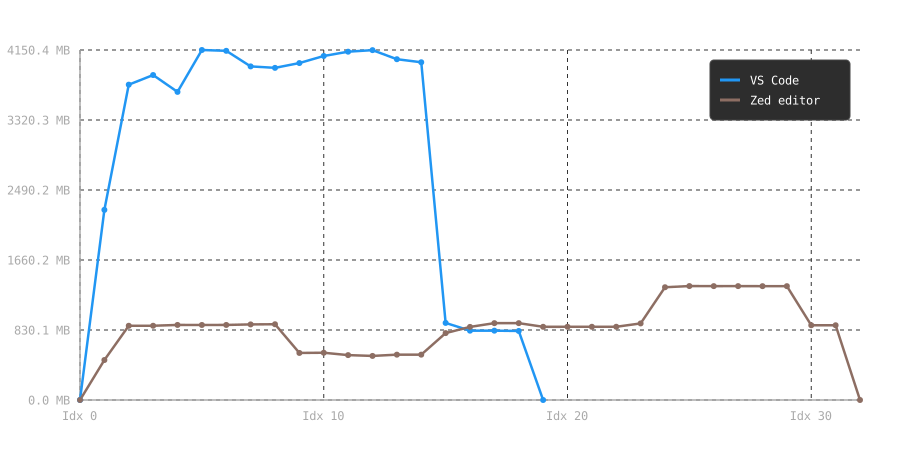
Visual Studio Code is obviously consuming more memory than Zed editor. But let’s talk in numbers!
| comparison | VSCode | Zed |
|---|---|---|
| mean average (MB) | 2,872 | 838 |
| highest (MB) | 4,150 | 1,351 |
| lowest (non-zero) | 818 | 474 |
Zed editor is the faster code editor according to this experiment I did. I personally hope Zed editor matches the support and developer experience of VSCode soon.
Key Features and Developer Experience 🔗
Out-of-the-Box Experience 🔗
- VS Code ships as a modular framework. Out of the box, it provides solid JavaScript/TypeScript support, basic Git integration, and an integrated terminal. To make it a full-featured environment for Rust, Go, Python, or C++, you must install language extensions.
- Zed arrives batteries-included for modern developer workflows. Language Server Protocol (LSP) integration, Tree-sitter parsing, auto-formatting, AI assistant integration, and multi-user collaborative editing are built into the core editor without needing external plugins.
AI Integration 🔗
- VS Code: Relies heavily on GitHub Copilot as its flagship AI experience, alongside extensions for Claude, Codeium, Tabnine, and local LLM clients (like Continue.dev).
- Zed: Treats AI as a first-class citizen. It features a dedicated panel for conversational AI, inline code generation, and direct prompt engineering using OpenAI, Anthropic (Claude), or local Ollama endpoints. You bring your own API keys or subscribe to Zed’s paid AI tier.
Real-Time Collaboration 🔗
- VS Code: Offers collaboration via Microsoft’s Live Share extension, which routes peer connections through Azure web services.
- Zed: Was designed from day one around CRDTs (Conflict-free Replicated Data Types). Collaborative editing, voice chat, and shared workspaces are natively integrated into the core editor UI, making remote pair programming seamless.
Extensions, Ecosystem, and Language Support 🔗
This is where the comparison shifts heavily in favor of VS Code.
Ecosystem Breadth
=================
VS Code: [████████████████████████████] 50,000+ Extensions & Language Tools
Zed:     [████                     ] Growing WASM Extension System
The VS Code Marketplace Advantage 🔗
VS Code’s marketplace contains tens of thousands of extensions covering every programming language, framework, cloud provider, and niche workflow imaginable. Extensions run in isolated worker threads, allowing complex UI additions, embedded previewers (HTML, Markdown, PDF), database clients, and remote development tools.
Zed’s WASM Extension Model 🔗
Zed uses a WebAssembly (WASM) sandbox model for extensions.
- Pros: Extensions are secure, fast, lightweight, and cannot crash or lock up the main editor process.
- Cons: The ecosystem is young. While basic syntax highlighting and LSP bridges exist for most popular languages, complex UI-heavy plugins (like embedded web previews, Docker management panels, or visual debuggers) are either limited or impossible under current API bounds.
Remote Development and Ecosystem Constraints 🔗
For enterprise developers, cloud engineers, and containerized workflows, remote capabilities are often a make-or-break factor.
- VS Code Remote (SSH, Dev Containers, WSL): Microsoft’s remote suite is unmatched. VS Code splits itself in two: a client UI running locally, and a
code-serverprocess running inside the remote server, Docker container, or WSL instance. Debugging, terminal access, and port forwarding work identically whether local or remote. - Zed Remote Development: Zed supports SSH-based editing, running a lightweight headless helper on the remote machine. However, support for Dev Containers and complex WSL integration is still evolving compared to VS Code’s mature toolset.
The “Test of Time” Factor and being “battle-tested” 🔗
The first time I factored these two is when I was distrohopping and I noticed having less troubles to troubleshoot when using a “mature” Linux distribution. Then I start thinking about why I called those distros “mature”? It turns out that maturity is developing and evolution of the software program while having it used by millions of people for different use cases and varying workflows. This is actually what passing the test of time means, and what being battle-tested.
Passing the test of time is being used for many years with increasing in adoption year on year; and not get abandoned.
Being battle-tested is when too many different users with varying use-cases and workflows and still wins those battle fields. Not being casted away or abandoned as a mediocre software.
I actually put more weight on software tools being battle-tested and passed the test of time, if not, I just keep an eye on them but not adopting them.
VSCode is obviously passed the test of time (a decade) and battle-tested. Zed is passing the test of time but not yet battle-tested enough. It is now in the battle field. I hope it survive both the test of time and the battle.
Future Viability 🔗
A critical question when choosing a primary editor is long-term sustainability.
The Case for VS Code’s Longevity 🔗
- Corporate Backing: Backed by Microsoft, VS Code receives massive engineering investment and monthly stable releases.
- Standardization: It has become the de facto reference implementation for modern developer tooling. LSP (Language Server Protocol) and DAP (Debug Adapter Protocol) — both pioneered largely around VS Code — are now industry standards.
- Ecosystem Lock-In: The sheer volume of extensions ensures that whenever a new language or framework emerges, a VS Code extension is created on day one.
The Challenges Facing Zed 🔗
- Historical Context: Atom — created by the same founder — was revolutionary, but succumbed to performance degradation and was eventually sunsetted by GitHub/Microsoft. Zed is explicitly designed to solve Atom’s performance issues, but building an open-source business model around a desktop editor is historically difficult.
- Platform Parity: While macOS performance is pristine, Linux support reached stable parity later, and Windows support remains behind macOS and Linux feature sets.
- Monetization & Open Source Balance: Zed is open source, but the company offers server-side collaboration features and managed AI services to generate revenue. Maintaining a healthy open-source core while building a profitable business will be a key balancing act.
Summary Verdict 🔗
Choose VS Code if 🔗
- You depend heavily on rich visual extensions, visual debuggers, Docker/Kubernetes management, or complex database plugins.
- You rely on Dev Containers, heavy WSL integration, or complex remote development workflows.
- You need absolute, fully polished cross-platform parity across Windows, macOS, and Linux today.
- You want a familiar tool where every issue, edge case, and configuration has been documented extensively online.
Choose Zed if 🔗
- Your highest priority is input latency, frame rate, memory efficiency, and raw editor speed.
- You work primarily in languages with strong LSP support (Rust, Go, TypeScript, Python, C/C++, Elixir, Zig).
- You want native, low-friction real-time pair programming and built-in AI support using your own API keys.
- You prefer a minimalist, clean UI that gets out of the way and operates like a hyper-modern native application.
Actually, no need to choose ONE 🔗
Just install them both, use them both for the same projects and tasks. See their advantages and disadvantages in your workflow and projects. After having more than 10 issues totally with both of them, compare the issues and challenges you faced, then choose the least problematic code editor of them. You still can use them both if you will. The elephant in the room here is “your miles will vary”.
I hope you enjoyed reading this post as much as I enjoyed writing it. If you know a person who can benefit from this information, send them a link of this post. If you want to get notified about new posts, follow me on YouTube , Twitter (x) , LinkedIn , and GitHub .